How to practice a Lost Ark Clash sequence
A Clash prompt shows a key and gives you a short window to press it. Pressing inside the Perfect window grades Perfect, pressing inside the wider Good window grades Good, and a press elsewhere in the window or no press grades Bad. The grade picks the next stage of the boss action. Clash practice replays that sequence from the client's own timing values for Thaemine the Lightqueller and the other bosses that use Clash, and shows which window an input missed.
Pick an action
The list holds each Clash action by its number, grouped under the bosses that own it. An action opens its prompts in a table: the keys the prompt can draw, and its Perfect and Good windows. Action 4265331 has three prompts. The first draws from eight keys, Q W E R A S D F, and its Perfect window runs from 4.370 to 4.610 with Good from 4.310 to 4.670. The next two draw from Q W E R.
An action with a prompt whose key is not known says so instead of offering Start. A prompt with a single fixed key is one case, and several prompts that feed one result are the other.
Run the sequence
Start opens the first prompt and runs the stage clock. The bar under the key shows the whole window, the Good zone in green, the Perfect zone in gold and a marker for the clock. Press the key on your keyboard or click it. Each answered prompt is added to a log with the clock time of your input, the grade and how far outside Perfect it fell.
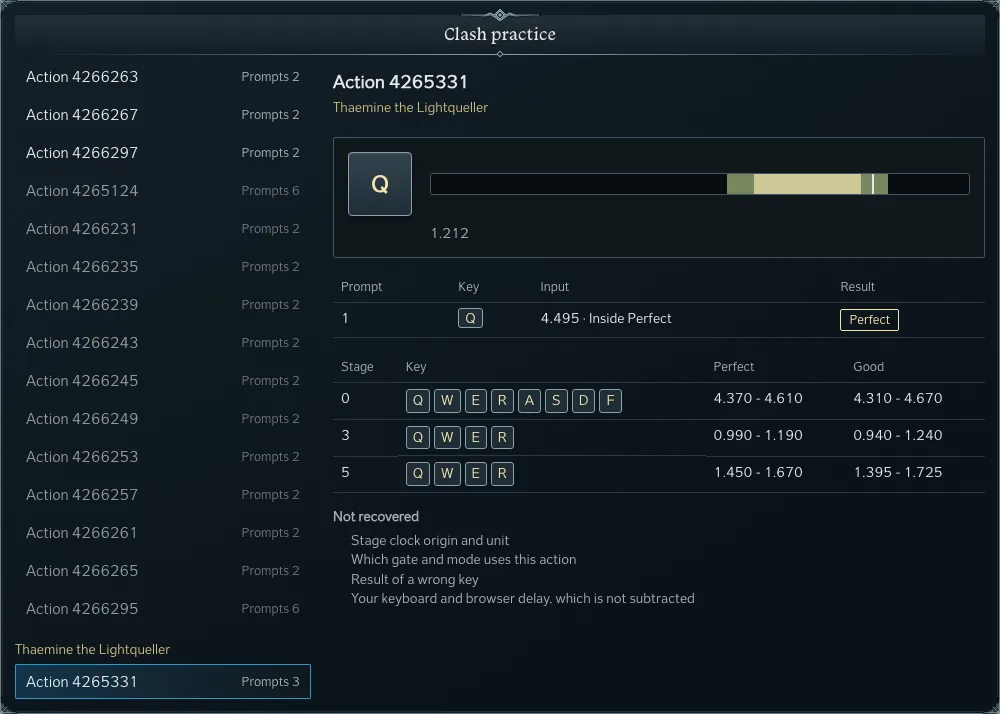
In the picture the first prompt was pressed at 4.495, inside Perfect. The marker for the second prompt sits at 1.212. Its Perfect window closed at 1.190, so a press now still grades Good and the log would read 0.022 after Perfect. Perfect and Good on this prompt both lead to the third prompt. Bad leads to stage 4, which ends the action as a Failure.
Read the result
An attempt ends on the stage that closes the action, as Success or Failure. The log keeps every prompt you met, including a prompt whose window passed without input. The page keeps your attempts, your counts of each grade and your best and latest run for each action. A link carries the action and the key sequence, so a friend opens the same prompts.
Leaving the tab while an attempt runs cancels it, because keys pressed in another window never reach the page. The page does not know the clock origin and unit of the stage clock, which gate and mode use an action, or what a wrong key does, and it does not subtract the delay of your own keyboard and browser.